
How to Read Your Prescription
How to Read Your Prescription
Reading an eyeglass prescription may seem confusing at first. This guide explains common terms like SPH, CYL, AXIS, ADD, and PD so you can order your glasses with more confidence.
Shop Prescription Glasses
What Is an Eyeglass Prescription?
An eyeglass prescription contains the lens measurements used to correct your vision. These measurements are written by an eye care professional after an eye exam and help determine how lenses should be made for each eye.
Most prescriptions include distance correction, near vision correction, astigmatism correction, and pupillary distance information.
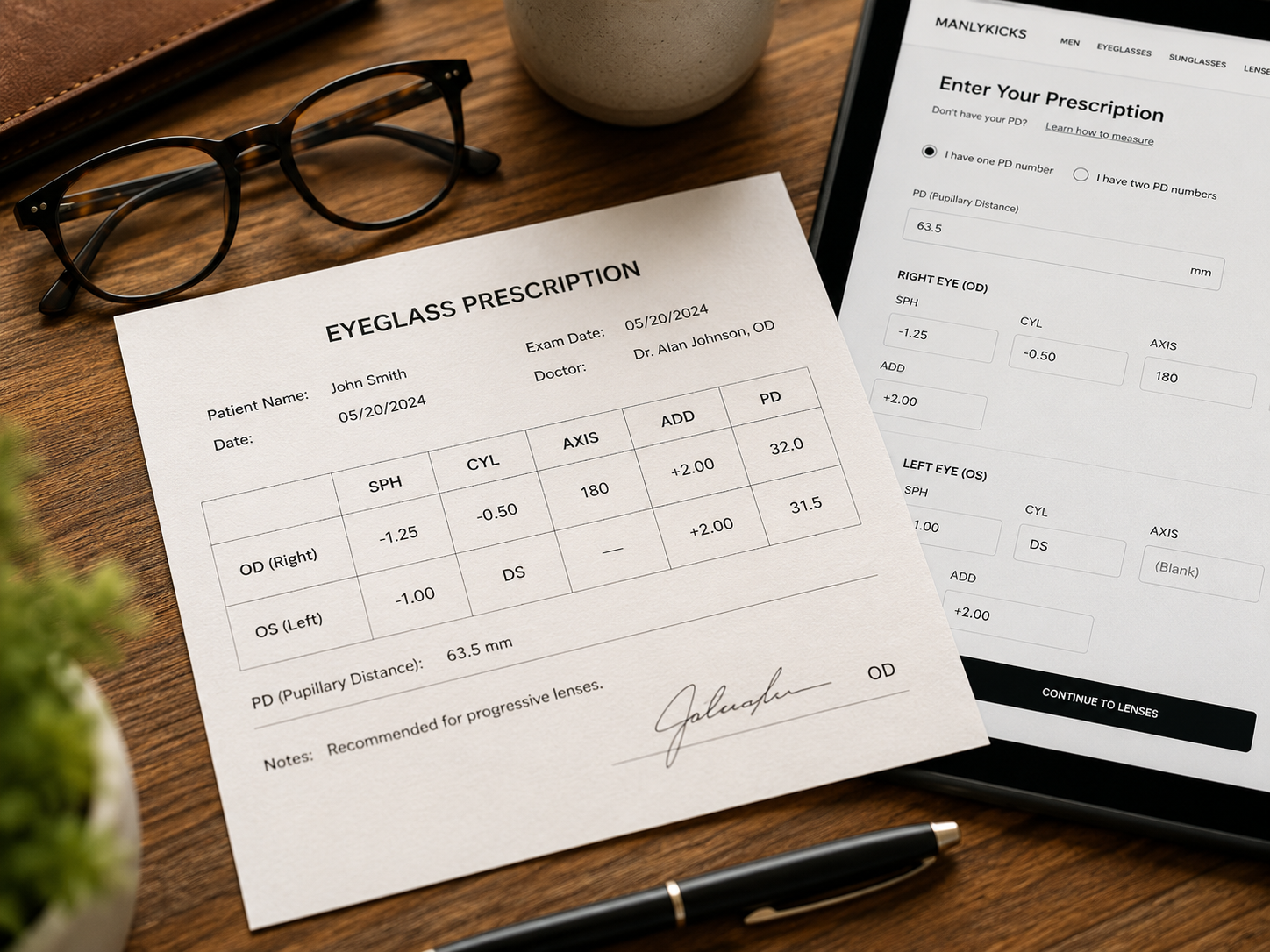
Understanding Common Prescription Terms
Different prescriptions may look different, but the core terms are usually similar.
OD refers to your right eye. Some prescriptions may simply use “Right” or “R”.
OS refers to your left eye. Some prescriptions may use “Left” or “L”.
SPH indicates lens power for nearsightedness or farsightedness. Keep the plus or minus sign exactly as written.
CYL measures astigmatism correction. If CYL is blank, you may not need astigmatism correction.
AXIS works with CYL and shows the direction of astigmatism correction, usually from 1 to 180.
ADD is additional magnification used for progressive lenses, bifocals, reading support, or computer lenses.
PD measures the distance between your pupils and helps align the optical center of your lenses.
Some prescriptions include prism correction for eye alignment. Enter prism values exactly as written.
OU refers to both eyes. It may appear when one value applies to both eyes.
Sample Prescription
Here is a simple example of how prescription values may appear.
| Eye | SPH | CYL | AXIS | ADD |
|---|---|---|---|---|
| OD / Right | -1.25 | -0.50 | 180 | +2.00 |
| OS / Left | -1.00 | DS | — | +2.00 |
How to Enter Your Prescription Online
Follow these steps when entering your prescription manually.
Check OD and OS
OD means right eye. OS means left eye. Make sure you do not switch them.
Enter SPH
Enter the SPH value exactly as written, including the plus or minus sign.
Add CYL and AXIS
If your prescription includes CYL, enter both CYL and AXIS values.
Enter ADD
ADD is commonly used for progressive lenses, bifocals, and reading support.
Enter PD
PD helps align your lenses correctly with your eyes for better comfort and clarity.
Single Vision vs. Reading vs. Progressive
Your lens type depends on how you need to use your glasses. Some prescriptions are for one viewing distance, while others include reading or multi-distance correction.
Single Vision
Corrects one viewing distance only, such as distance or reading.
Reading Glasses
Designed mainly for close-up reading and near tasks.
Progressive Lenses
Combine distance, intermediate, and reading vision in one seamless lens.
Important Things to Check
A missing sign can completely change the lens power.
Make sure right eye and left eye values are entered in the correct fields.
Incorrect PD may affect comfort, clarity, and lens alignment.
If CYL or AXIS are not included, you usually do not need to enter them.
ADD is important for progressive, bifocal, reading, or near-vision lenses.
If you are not confident entering values manually, upload your prescription image.
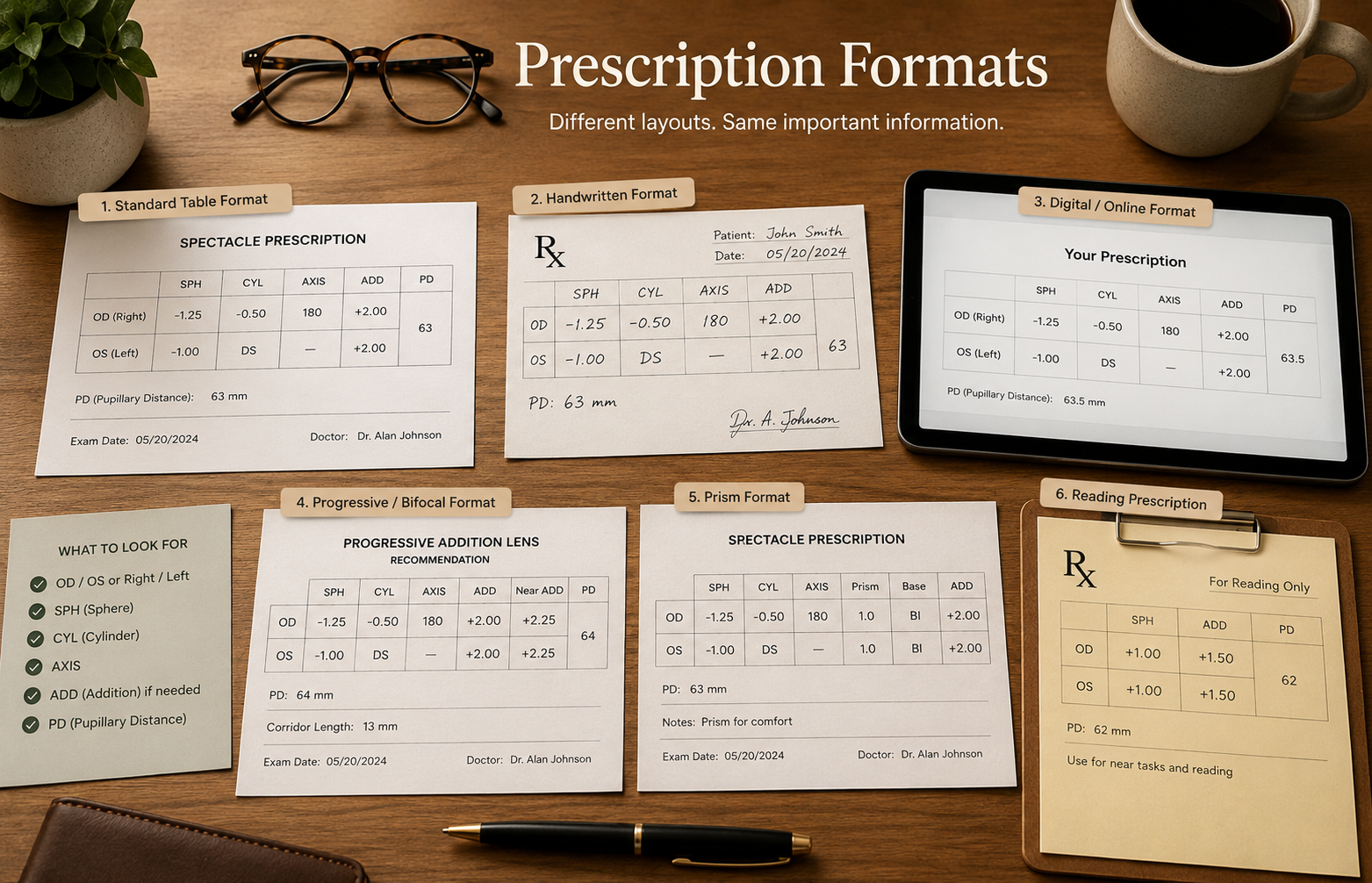
Common Prescription Formats
Prescriptions may appear as printed tables, handwritten forms, digital prescriptions, progressive lens prescriptions, reading prescriptions, or prism prescriptions.
The layout may vary, but the prescription terms are usually similar. Look for OD, OS, SPH, CYL, AXIS, ADD, and PD values first.
FAQ
What does SPH mean?
SPH refers to the lens power used to correct nearsightedness or farsightedness.
What if CYL is blank?
If CYL is blank or marked DS/SPH, you may not need astigmatism correction.
What does ADD mean?
ADD is additional magnification used for reading or progressive lenses.
What is PD?
PD measures the distance between your pupils and helps align your lenses correctly.
Can I order glasses without PD?
Some glasses can technically be ordered without PD, but accurate PD measurements are strongly recommended for the best visual comfort.
What if I cannot understand my prescription?
You can upload your prescription image during checkout, and we can help verify the information.
Can I use my reading prescription for progressive lenses?
Sometimes, but progressive lenses usually require more complete prescription information, including distance correction and ADD values.
Need Help With Your Prescription?
Upload your prescription or explore lenses designed for modern daily life. Understanding your prescription is the first step toward clearer everyday vision.